If you’re driving an older car and want to be able to jam out to your tunes and make calls over your car’s speakers without installing a new head unit , you have a few options.
Most newer cars come equipped with Bluetooth already, but if you have an older vehicle that doesn’t have such a feature, there are a few options that you can take advantage of, most of which are fairly inexpensive and easy to set up.
You can usually plug your phone into your car’s stereo with an audio cable, but why do that when you can go wireless? Here’s how you can add Bluetooth capabilities to your factory car stereo
Bluetooth in the car has become very popular with many drivers; so much so that many high-end cars are now being produced with Bluetooth capability built in. Bluetooth in cars helps facilitate hands-free phone calling, something that more and more states are requiring by law. Studies show that hands-free devices make using cell phones in cars far safer, thereby reducing the number of cell phone related accidents. However, many cars are still produced without built-in Bluetooth capability, and in this case, only aftermarket additions like car audio Bluetooth adapters can solve this need.
Universal Bluetooth Kits
Universal Bluetooth car kits are usually simple to use and add excellent hands-free calling features to just about any car or truck. Most universal Bluetooth kits are simple, standalone devices making them simple to install and simple to use. Often, these are an integrated speaker and microphone combo kit that attaches to the car's sun visor, mirror, or dashboard. A simple push of a button will answer an attached cell phone or begin the voice dialing feature. Another simple button push ends the call. The simplicity of these devices is both a boon and a bane; although the simplicity makes them easy to operate, the simplicity also limits the features they are capable of. These devices are not capable of streaming music from a Bluetooth-enabled MP3 player or cell phone. One major benefit, however, is that these devices can be moved from car to car with relative ease.
More complex universal kits do exist that integrate with the existing stereo. They have the same hand-free capabilities as the simpler kits, but use the car's speakers to sound out the call's incoming audio. Additionally, these kits often, though not always, have the ability to stream music from a cell phone or Bluetooth-enabled MP3 player. The downside to these kits is that the car's stereo often has to be removed to attach a few wires; these kits are not easily moved from car to car for this reason.
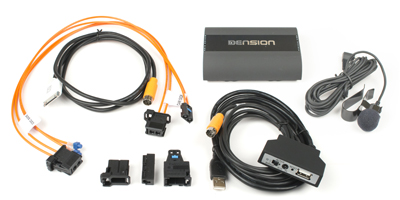
Similar to integrated universal Bluetooth car audio adapters, stereo-specific car audio Bluetooth adapters require the stereo to be removed. These devices are attached to the back of the stereo, either via a few cables or through an add-on port adapter cable. These allow the car's stereo to interface directly with the Bluetooth adapter, and many models allow caller information to display on the stereo's display. Additionally, these add-on modules allow the consumer to answer phone calls by using the stereo's controls, meaning no additional buttons or devices need be present.
Like the universal kits, however, a microphone must be clipped to the sun visor or somewhere on the car's dash. These systems are always more fully integrated than universal kits and provide a user experience identical to that of a manufacturer installed system. For an added bonus, most of these systems will play streamed music from a cell phone or Bluetooth-enabled MP3 player. For added convenience, incoming calls will mute music played by the stereo; a feature many universal kits lack.
Stereos with Built-in Bluetooth
Although technically not an adapter, it is worth mentioning aftermarket Bluetooth Car Stereos.. Installation is much easier than stereo specific Bluetooth adapters since there is no additional box that must be hidden somewhere behind the dash. These aftermarket Bluetooth stereos provide a fully functional, integrated Bluetooth experience allowing calls to be answered using the stereo's controls. These stereos almost always include the ability to receive streamed music from cell phones and Bluetooth-enabled MP3 players. Additionally, all audio functions will mute or pause when an incoming call is received.
A quick search at Oem Auto Integration for in-dash receivers with Bluetooth and iPod compatibility shows units starting at $150. However, installation costs can vary widely, so make sure to get an estimate from an installer before getting the work done. Alternatively, if you are handy with tools, head units are not that difficult to install on your own. Just make sure you have the proper installation kit for your vehicle so the head unit will fit well in the dashboard.
Adapter kit
If you do not want to replace the head unit in your car, you may find an adapter that will work with your existing in-dash head unit. Companies such as USA Spec , Grom Audio , Dension , Vais Technology and MoBridge make components that plug into an existing car stereo, enabling an iPod or iPhone cabled connection, and sometimes Bluetooth. You will need to see if an adapter is available for your particular make and model of vehicle.
These adapters have the advantage of preserving the look of your dashboard. However, these kits can cost as much as a replacement stereo, and may require professional installation, adding to the cost. As your existing car stereo was not made to play music from an iPod or iPhone, you will not be able to select music by album, artist, or song. Some of these adapters trick the stereo into thinking your iPod is a CD changer, making the first six playlists appear as CDs in the changer on the interface.
Over the past decade, more and more cars have come equipped with a simple auxiliary input. If your car has one, you can plug a 1/8-inch adapter cable from an iPhone's or iPod's headphone jack directly into it. There are also a few ways of adding an auxiliary input to an older car's stereo. If your car has an RCA connection (red / white round connectors) or you would like to not have a head unit at all , such as with a Classic car , rod or Classic Porsche there are available amplifiers that can be connected or stand alone control with your connected smartphone via cable or wirelessly through Bluetooth.
For a Free Consultation contact us
or call 317-403-0265
Give us the :
- Year / Make / Model of vehicle
- Type of Device you are using ( iPhone , Android , USB etc)
- Type of features or integration you would like to have




 got together and ranked these trucklets in order from worst to best. Compared side by side, the segment is transformed from a bland monolith to a surprisingly diverse group of vehicles, and one that truly does offer something for just about everyone.